Table of Contents
A government client's SearchStax usage climbed from under its 2.5 million monthly request limit to roughly 4 million requests in August, which put the site on course for a much more expensive plan. The cause was Google and Bing crawling an internal document library meant for a small group of board members, where every filter combination they tried created a new request that SearchStax counts. The Document Library's faceted navigation had become a crawler trap.

The fix was a decision about access. The Document Library is an internal tool for board members, so it had no place in search results, and the client's team blocked search engines from it. That is standard practice for content that doesn't belong in search, and it resolved the overage where caching and geo-blocking had not.
Running Acquia Search on SearchStax?
Download the Drupal Bot Protection Playbook
Why does a search request cost more than a page view?
On a Drupal site, a module called Search API hands off each search query to a backend index, in this case Solr, reached either through Acquia Search directly or through Acquia Search powered by SearchStax. Drupal caches a search result once it comes back, keyed to the exact combination of parameters that produced it. The next visitor who runs that same search gets served the cached version, and the backend never hears about it.
That caching works well when a small set of queries repeats, which is normally how a document library search behaves: a handful of staff members running a handful of common searches, over and over. It breaks down the moment something starts generating queries that never repeat. A crawler trying every possible combination of search filters produces a fresh, never-seen-before query each time, so every one of those requests is a cache miss by definition, and every cache miss goes straight to Solr.
How is crawl budget different from a search entitlement?
Crawl budget and SearchStax entitlements are two separate meters. On a site where search results are crawlable, the same crawler traffic can drive both at once.
Google defines crawl budget as the set of URLs it can and wants to crawl on a site, shaped by crawl demand and by how much crawling the server can handle. Google Search Console's Crawl Stats report shows that activity on a rolling basis, typically over the past 90 days.
Acquia Search and SearchStax meter something else: a subscription limit on search-service queries, billed by tier and counted the same way whether the request came from a person, Googlebot, or any other automated traffic. In this case, Google and Bing used up the crawl budget and SearchStax requests on the same filter combinations at the same time.
Why did faceted navigation turn the Document Library into a crawler trap?
A faceted search page works by letting a visitor narrow results with filters (department, date range, document type), and that same design is what makes it dangerous to a crawler. Each filter can combine with every other filter, so a library with even a handful of facets can generate thousands of distinct, individually addressable search URLs.
A crawler treats every filter combination as its own page, so one search page with filters looks like thousands of separate pages, each one worth a visit. That's what happened on the Document Search.
There, the bots tried every possible combination of filters. Each combination produced a query that was cached once and never requested again, so caching saved nothing, and every one of those queries counted as a new request to Solr and against the SearchStax entitlement.
This is the condition SEO calls a crawler trap: a part of a site that produces so many combinable URLs that a crawler can spend an unbounded amount of effort inside it without ever running out of new pages to try.
The standard toolkit for this includes caching, rate limits, narrowing what's crawlable, and excluding crawlers outright. Picking the right one depends on what's actually generating the traffic and whether it's worth anything to have crawled at all.
How did the team fix the SearchStax overage?
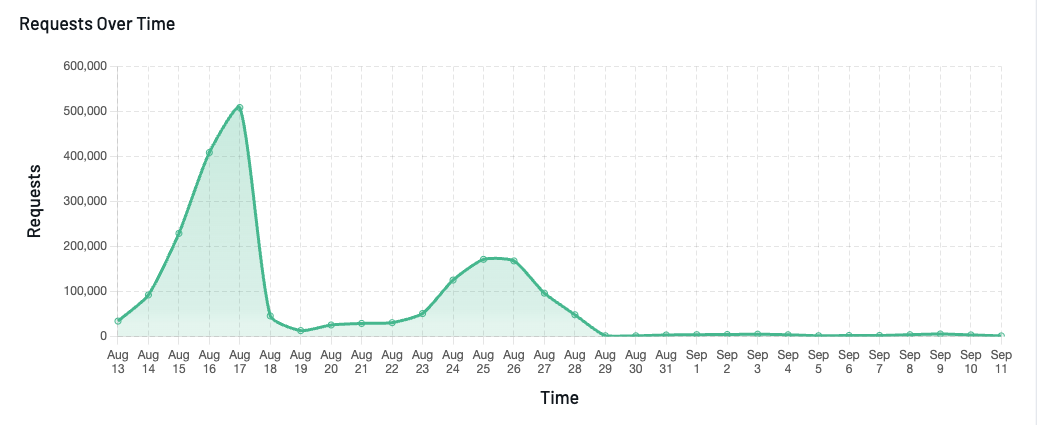
The overage began after the move to SearchStax, and it took four changes over three months to resolve. The first two reduced the load without fixing it, and the last two, aimed at the specific traffic causing the spikes, did.
| Month | What Changed | Result |
|---|---|---|
| June | Caching added to all site pages. Search still ran on Acquia's legacy Solr and was not cached. | Faster pages and less load on the origin server. No search entitlement existed to exceed. |
| July | Search moved to Acquia Search powered by SearchStax, and usage ran high immediately. Non-US traffic blocked in Cloudflare. Work began on caching search results in Drupal. | Usage was high from launch, reaching about 3 million requests. |
| August | Search-result caching went live. Known bots blocked from the Document Library search pages (mid-August). Managed Challenge added to the Document Library (August 28, 2026). | Usage peaked near 4 million requests, then dropped sharply after each of the last two changes. |
Why did usage climb after the move to SearchStax?
The move to SearchStax is where the problem started. Acquia is ending support for its legacy Solr search in favor of SearchStax, so the site moved in July. The earlier Solr setup had no comparable request limit, so the crawler traffic had never cost anything. We watched closely from the day the new search went live and saw SearchStax usage running high almost immediately.
What did caching and geo-blocking do?
Neither made a lasting difference. Caching across the whole site, including search results, helps when the same query repeats, but a crawler that generates a new filter combination on every request produces only cache misses. Blocking non-US traffic in Cloudflare removed traffic from outside the country, and much of the crawler traffic hitting the library originated inside it. Usage kept climbing.
Why were Googlebot and Bingbot blocked?
Blocking known crawlers from the Document Library search pages removed the largest source of traffic. The block covered Googlebot and Bingbot, and it went in during mid-August.
We wouldn’t normally block a resource from known bots, so the idea came from the client, who knew better than anyone what their stakeholders would accept. The Document Library is a tool used by board members, and the public was never going to search for it. The client judged that search engines had nothing to gain from being there.
What did the Cloudflare Managed Challenge handle?
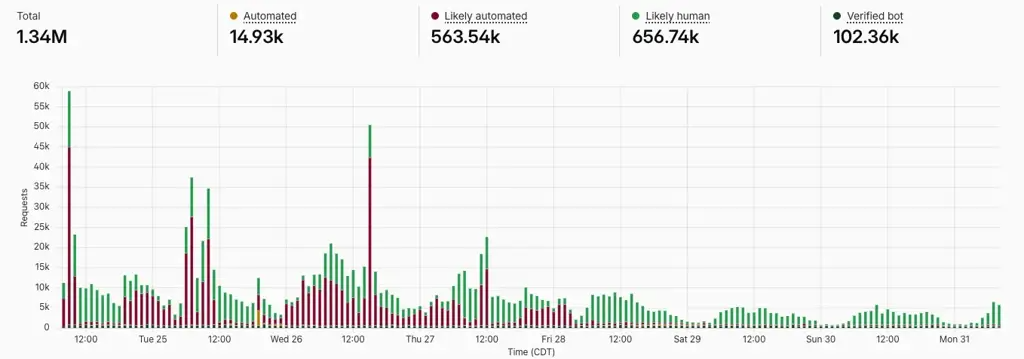
The Managed Challenge covered the traffic that carries no bot signature. After the known-bot block, a second category of traffic remained: requests that Cloudflare classified as "likely automated" without a named bot attached. A block rule has nothing to target in those requests, so the team added a Cloudflare Managed Challenge to the Document Library on August 28, 2026.
The Challenge slows or stops bot-like automation, including traffic that would ignore an exclusion rule even if one existed. Cloudflare now classifies most Document Library traffic as "likely human," and SearchStax requests fell with it.
What did the SearchStax numbers show?
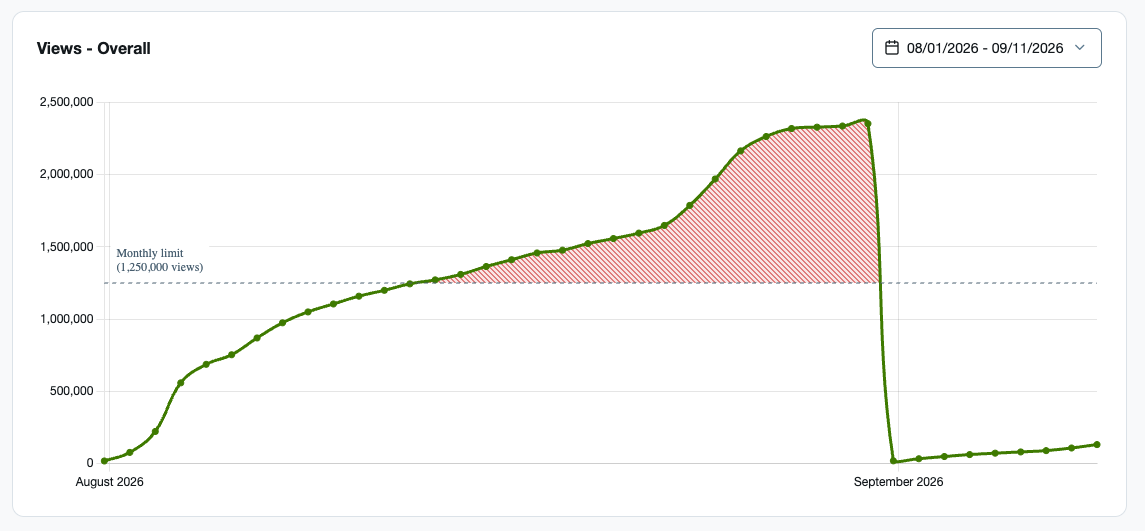
The client's plan covered 2.5 million requests a month. Usage reached roughly 3 million in July and 4 million in August. By a third of the way through September, it had dropped to about 36,000 requests, which puts the full month on pace for roughly 110,000.
The same traffic was also pushing the site over its Acquia Views entitlement. Many of the bot-generated URLs were unique and had to be served from the origin server, which Acquia meters. The chart below shows how far over the entitlement August ran. The line flattens in late August as the Managed Challenge takes effect. The drop at the start of September is the monthly counter resetting.
How can you keep faceted navigation from running up your search bill?
Start by asking whether a search engine has any reason to be in this part of your site, because the answer changes what the rest of the checklist should do. There are four steps.
1. Decide whether a search engine needs to be there
Public-facing search (a product catalog or a knowledge base) is worth being found through Google. An internal tool such as a staff directory or a board document library usually belongs outside search. That distinction is what the client's own team worked through before deciding how to handle the Document Library.
2. Block crawlers from content that doesn't belong in search
For public content, Promet Source's standard Cloudflare WAF guidance is to let legitimate search crawlers through and block the rest. Content with no public search value, like an internal tool, gets blocked from crawlers entirely. Here that meant Googlebot and Bingbot on the Document Library search pages.
3. Add friction for traffic without a bot signature
Some automated traffic arrives without identifying itself as a bot. For requests Cloudflare can only classify as "likely automated" rather than attribute to a known crawler, a Managed Challenge adds friction without an outright block, which is what the team used for the Document Library's remaining automated traffic.
4. Apply rate limiting and caching at the pages actually taking the hits
Our Cloudflare WAF work calls out this exact pattern directly: search or API endpoints get hammered by automated requests, draining a hosting plan's entitlements, which is exactly what happened here. Custom caching and rate limiting at those specific high-risk pages, rather than applied evenly across the whole site, is part of Promet Source’s standard turnkey Cloudflare configuration.
Does crawler traffic affect SearchStax or Acquia Search pricing?
Yes. SearchStax and Acquia Search are priced by tier, based on how many search-service requests a site generates in a month, and crawler requests count the same as human ones.
In this case, the client was paying upwards of $5,000 a year for 2.5 million requests a month. Moving to the next tier, at 5 million requests, would have cost this client nearly five times as much. Only search requests count toward this kind of plan, so a bot or a visitor that generates one adds to the bill whether or not the search returns anything useful.
Pricing tiers and entitlements are set by Acquia and SearchStax and can change. The figures above describe this client's plan and are not list prices, so confirm current pricing with Acquia or SearchStax before budgeting against them.
What should you check before moving to Acquia Search powered by SearchStax?
Before moving to SearchStax, check each search on your site and decide whether a search engine belongs there. The move puts a price on every search request, including the ones nobody on your team made. Under legacy Solr, crawler traffic to the search pages cost this client nothing extra. Under SearchStax, each of those requests counted toward a plan limit, and the next plan up cost nearly five times as much. Universities and colleges running Acquia Search face the same migration and the same exposure.
The client's site ran seven searches, and the Document Library drew the most traffic by a wide margin. Detecting where the traffic was going took a look at the site's analytics and at Cloudflare's split between likely human and likely automated requests. A team on the same path can run that review before the first overage arrives.
Know who is searching your site before the invoice tells you
Your team can run the review described in this article with data it already has: Cloudflare's traffic classifications, SearchStax request counts, and Acquia Views. The Drupal Bot Protection Playbook covers how we protect search pages, APIs, and forms from abusive automated traffic. If you would rather hand it off, our Turnkey Cloudflare WAF service applies custom rate limiting and caching to the pages taking the hits.
Stop paying for searches nobody made.

John Lutz is a Principal Drupal Developer at Promet Source. He writes about Drupal search, Solr, and CMS migration for state and local government.





Get our newsletter
Get weekly Drupal and AI technology advancement news, pro tips, ideas, insights, and more.